How to Run a Bitcoin Full Node in 2026
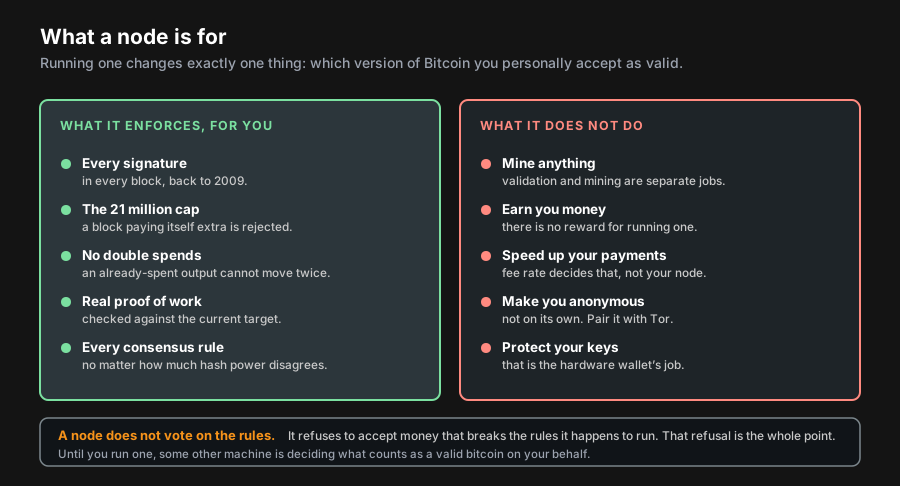
Running a full node changes exactly one thing, and it is not a small thing: your machine, rather than somebody else's, decides which version of Bitcoin's rules you accept. Every signature, every block subsidy, every proof of work gets checked locally. A block that breaks a rule is rejected on your hardware regardless of how much mining power stands behind it.
You need roughly 757 GB of disk for the full chain, or about 7 GB if you prune, plus a one-time download of around 740 GB. It earns you nothing, it will not speed up your payments, and it is still the single most useful thing you can do to stop trusting companies about your own money.
What does running a node actually get you?
Three concrete things, and it is worth being precise because the topic attracts a lot of vague talk about sovereignty.
You stop asking anyone whether you were paid. A light wallet queries a server, and that server can lie by omission, show you a balance that is not there, or simply log every address you have ever owned against your IP. Point your wallet at your own node and the question never leaves your house.
You enforce the rules you actually agreed to. This is the part that sounds abstract until a contentious fork happens, at which point it becomes the only thing that matters. During the 2017 block size fight, users running their own nodes were the reason a chain with overwhelming industry backing failed to become Bitcoin. Nodes do not vote. They refuse, and enough refusals make a proposal irrelevant.
You get privacy that no service can offer you. Address-based surveillance depends on a third party seeing which addresses you ask about. Your own node asks nobody.
What you do not get: money, faster confirmations, or anonymity by default. Confirmation speed is a fee-rate question, covered in our guide to Bitcoin fees and the mempool. And mining is an entirely separate activity that your node does not perform, which our piece on mining profitability goes into.
What hardware do you actually need?
Bitcoin.org's stated minimum is genuinely minimal: 7 gigabytes of free disk at 100 MB/s or better, 2 gigabytes of RAM, upload of at least 400 kilobits per second, and 6 hours a day of uptime. That disk figure assumes you are pruning. It is a real configuration and it works.
It is also not what you want, because the gap between "boots" and "you never think about it again" is about eighty dollars.
| Tier | Storage | RAM | What syncing feels like | Rough cost |
|---|---|---|---|---|
| Stated minimum pruned, old laptop | 7 GB free, 100 MB/s | 2 GB | Slow, but it finishes | $0 if you own it |
| Pruned Raspberry Pi | 256 GB SSD | 4 to 8 GB | A day or two, unattended | $140 to $220 |
| Full archival, recommended | 2 TB NVMe SSD | 8 GB | Hours, not days | $220 to $400 |
| Repurposed desktop | 2 TB SSD | 16 GB | Fastest, and noisiest | $80 for the drive |
| Spinning hard disk | any size | any | Days. Do not. | cheap, and a mistake |
For a dedicated box, the usual build is a Raspberry Pi with an SSD in a USB enclosure. The parts are ordinary computer hardware and marketplaces are fine for them: Raspberry Pi 5 starter kits, 2 TB NVMe drives with USB enclosures, and a decent microSD card for the operating system. Hardware wallets are the one category we never link on a marketplace, and that stays true here.
On software support, Bitcoin Core 31.0 requires Linux kernel 3.17 or newer, macOS 14 or newer, or Windows 10 version 1903 or newer. If you were planning to repurpose something genuinely ancient, check that first.
How much disk, really?
This is where published guidance drifts, so here are measured numbers rather than a figure copied from a page nobody updated.
On 29 July 2026, Blockchair reported the chain at 757.66 GB at block 960,126. Blockchain.com's daily block-size series put it at 757.3 GB on 28 July. Two independent sources, agreeing to within half a percent. Meanwhile bitcoin.org describes the chain as "roughly 740 gigabytes now" and the Bitcoin Core download page still says the initial download is "about 600GB of data." Neither is dishonest; both are snapshots that aged. Trust the slope, not the sentence.
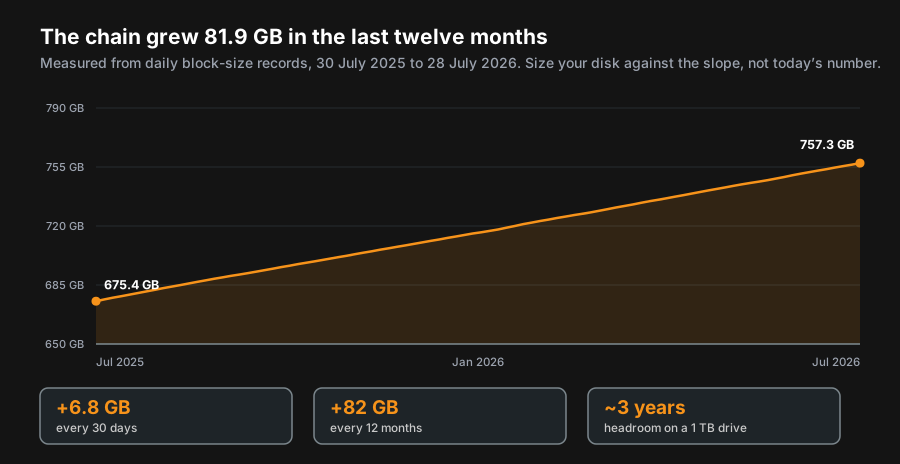
Do the arithmetic before you buy. A 1 TB drive holding 757 GB today has about 240 GB spare, which at 82 GB a year is roughly three years before you are shopping again. A 2 TB drive has over fifteen. The price difference is smaller than the cost of doing this twice, and you also need headroom above the raw block files for the chainstate database and any optional indexes.
What does pruning cost you?
Almost nothing that matters, which is the most under-advertised fact in this entire subject.
A pruned node downloads and fully validates every block from genesis onward, exactly as an archival node does. It then deletes the old block files it no longer needs, keeping the chainstate that describes which coins currently exist. Your security is identical. You verified everything; you just did not keep the receipts. Set prune=N in bitcoin.conf, where N is a target size in mebibytes, and the minimum value above zero is 550.
| Capability | Archival node | Pruned node |
|---|---|---|
| Validates every consensus rule | yes | yes, identically |
| Your wallet's privacy | yes | yes, identically |
| Storage needed | 757 GB and rising | about 7 GB |
| Serves historic blocks to new nodes | yes | no |
Works with -txindex | yes | no, incompatible |
Can -rescan an imported old wallet | yes | no, incompatible |
| Runs a public block explorer | yes | no |
There is a social argument against pruning, and it is fair. New nodes can only sync because existing nodes serve them historic blocks. If everyone pruned, nobody could bootstrap. If you have the disk, keep the archive and treat the extra 750 GB as rent on a network you use. If you do not, prune without guilt, because a pruned node still validates and still refuses bad blocks, and that is the part that defends the rules.
How much bandwidth does it use?
The download is predictable. The upload is what gets people in trouble with an ISP.
Bitcoin.org puts the one-time sync at around 740 GB, then roughly 20 GB a month afterwards, and notes plainly that "it's common for full nodes on high-speed connections to use 200 gigabytes upload or more a month." That upload is you serving old blocks to strangers syncing their own nodes. It is the network working correctly, and on a metered connection it is also a bill.
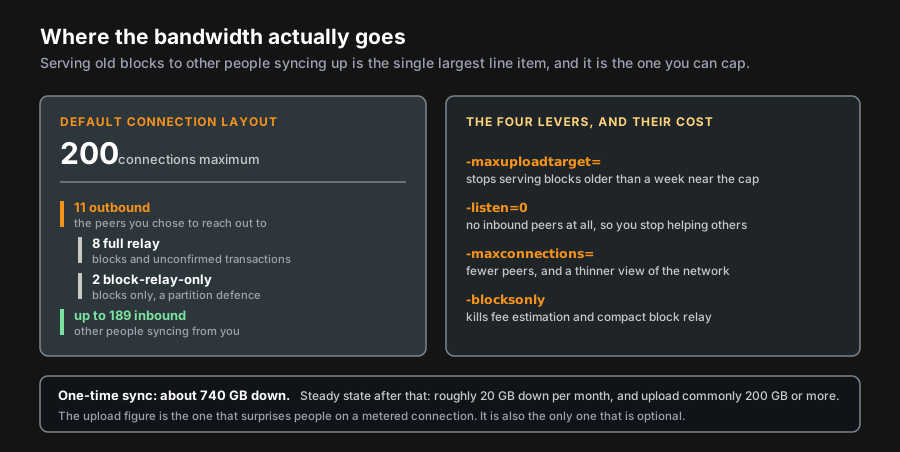
Four levers, in the order we would reach for them:
-maxuploadtarget=in mebibytes per day. As the target approaches, the node stops serving blocks older than a week but keeps relaying new ones. This is the right first move: it caps the cost without leaving the network.-maxconnections=trims the peer count. Keep it in the double digits; Bitcoin's trustless model works best with a handful of independent peers.-listen=0stops inbound connections entirely. Your traffic drops hard and you stop helping anyone else sync.-blocksonlyis the blunt instrument. It disables transaction relay, and the costs are specific: fee estimation stops working,walletbroadcastgets set to 0, and block propagation slows because compact block relay needs transaction relay to function.
How long does the initial sync take?
Longer than you expect, and the bottleneck is rarely your internet connection. The node is verifying on the order of a billion transactions and building the set of currently unspent outputs as it goes, which is small random reads and writes rather than a big sequential download. That is why an SSD finishes in hours and a mechanical drive takes days.
The cache matters more than most guides admit. Bitcoin Core 31.0 raised the default dbcache from 450 MiB to 1024 MiB on machines with at least 4096 MiB of RAM, explicitly trading memory for speed, and you can hand it more temporarily during the first sync and drop it afterwards. On a machine with 16 GB spare, a few gigabytes of cache turns a long evening into a short one.
| Change | Effect on sync time | Why |
|---|---|---|
| SSD instead of a mechanical drive | Large | Validation is random access, not a big download |
Raising dbcache | Large | Fewer database writes while building the UTXO set |
| A faster CPU | Moderate | Signature verification is the other half of the work |
| A faster internet connection | Small | Rarely the bottleneck past modest speeds |
| More peers | Small | You are not usually starved of blocks |
| Enabling pruning | None | Every block is still downloaded and verified first |
Two other things worth knowing about the current release. Bitcoin Core 31.0 shipped the cluster mempool rework, replacing the old ancestor and descendant limits with clusters of up to 64 transactions and 101 kB of virtual size, which changes fee-bumping behaviour if you have scripts that depended on the old rules. It also added -privatebroadcast, which sends your own transactions exclusively over Tor or I2P so the network cannot tie them to your IP address. If you care about the privacy argument for running a node at all, turn that on.
What goes wrong once it is running?
Very little, which is the good news. The failures that do happen are boring, predictable, and mostly about the disk.
The disk fills up. An archival node grows about 6.8 GB a month whether you are paying attention or not, and a node with nowhere to write stops being a node. Either leave real headroom when you buy the drive, or switch on pruning before you need to rather than during a scramble.
Power gets pulled mid-write. Yanking the plug on a database that is committing can leave the chainstate inconsistent, and the repair is a rebuild from the block files you already have. On an archival node that is slow and dull but entirely local. On a pruned node it is worse, because the old block files were deleted on purpose, so the rebuild has to fetch them from the network again. If your node lives somewhere with flaky power, a small uninterruptible supply is cheaper than repeating a sync.
You only ever get eleven peers. That is the outbound count, and it means nothing inbound is reaching you. Usually the cause is that port 8333 is not forwarded on the router. Nothing about your own validation is affected; you are simply not serving anyone else. Forward the port if you want to contribute, or run over Tor and skip the router question entirely.
| Symptom | Usual cause | Fix |
|---|---|---|
| Node halts, disk full | Archival growth of about 6.8 GB a month | Enable pruning, or move to a larger drive |
| Long rebuild on startup | Power lost mid-write | Let it finish. A small UPS prevents a repeat. |
| Never more than 11 peers | Port 8333 not forwarded | Forward it, or run over Tor and ignore it |
| Sync crawling for days | Mechanical disk, or a small cache | Move to an SSD, raise dbcache |
| Upload bill far above expectations | Serving historic blocks to syncing nodes | -maxuploadtarget in MiB per day |
| Wallet balance loads with the node off | Still pointed at somebody else's server | Recheck the wallet's server setting |
It falls behind while you are away. Not a problem. A node that has been off catches up on the blocks it missed at startup, and unless you have been gone for weeks that takes minutes. The 6 hours a day in the minimum requirements is a real threshold, not a polite fiction. Continuous uptime only matters if you are serving other nodes or running a Lightning channel, where being offline has actual consequences.
What does not happen is the thing new operators worry about most: your node cannot be tricked into accepting an invalid chain by peers feeding it bad data. It checks everything itself and disconnects peers that send nonsense. Being connected to hostile peers is an inconvenience, not a compromise.
Should you build one or buy a box?
| Build it yourself | Prebuilt appliance | |
|---|---|---|
| Cost | $140 to $400 in parts | typically several hundred more |
| Time to running | an evening, plus the sync | under an hour, plus the sync |
| What you learn | how the thing actually works | how one vendor's dashboard works |
| If the vendor disappears | nothing happens | you own hardware and a dead update channel |
| Extras | whatever you install | Lightning, explorer, wallet server, preconfigured |
| Honest verdict | Do this if you are curious. | Do this if you value the hour more than the money. |
Connecting your wallet to your own node
This step is the one people skip, and skipping it wastes the entire exercise. A node you never query is a space heater with strong opinions.
Most self-custody wallets accept a custom server. Sparrow, Electrum and BlueWallet all do, as do the coordinator applications used for multisig setups. You will usually need an index layer such as Electrs or Fulcrum sitting between the wallet and Core, since Bitcoin Core does not itself answer address-history queries. Point the wallet at your own machine, then check the obvious thing: turn the node off and confirm the wallet notices. If the balance still loads, you are still talking to someone else's server.
Once that link works, the public block explorers become a convenience rather than a dependency, and the privacy leak of looking up your own addresses on a website closes. Pair it with a hardware wallet from our hardware wallet comparison, back the keys up per the cold storage guide, and you have removed every third party from the loop except the miners.
Related on BTCLinks
Sources
- Bitcoin.org: Running A Full Node. Source of the minimum requirements quoted verbatim, the 740 GB first-sync and 20 GB monthly figures, the 200 GB upload note, the "over 750GB to around 7GB" pruning claim, the minimum
prunevalue of 550, and the incompatibility with-txindexand-rescan. Verified 2026-07-29. - Bitcoin Core 31.0 release notes. Source of the
dbcachedefault rising from 450 MiB to 1024 MiB on machines with at least 4096 MiB of RAM, the cluster mempool limits of 64 transactions and 101 kB,-privatebroadcast, and the supported platform list. Verified 2026-07-29. - Bitcoin Core download page. Current release 31.1, and the source of the "about 600GB" and "5-10GB per month" figures noted above as trailing the measured chain size. Verified 2026-07-29.
- Bitcoin Core: Reduce Traffic. Source of the 200-connection default, the 11 outbound peers split into 8 full-relay and 2 block-relay-only plus an occasional feeler, and the documented costs of
-maxuploadtarget,-listen=0,-maxconnectionsand-blocksonly. Verified 2026-07-29. - Blockchair Bitcoin statistics API. Chain size of 757,664,496,901 bytes at block 960,126, read 2026-07-29.
- Blockchain.com blocks-size chart data. The twelve-month series behind our growth chart: 675.4 GB on 2025-07-30 rising to 757.3 GB on 2026-07-28, an increase of 81.9 GB across 363 days. Retrieved 2026-07-29.
- Bitcoin Core: Managing the Wallet. Backup and restore behaviour for descriptor wallets referenced in the wallet section. Verified 2026-07-29.
Some links are affiliate links. As an Amazon Associate we earn from qualifying purchases. We do not link hardware wallets on marketplaces; buy those direct from the manufacturer. Not financial advice.